

More pixels can give you more detail to work with. The useful question is whether that detail helps you see what matters at your door, around your home or at your business.
The short answer
There is no resolution that is right for every camera or doorway. A higher resolution can give you more room to crop an image and examine a smaller part of it. But the result also depends on what is in the frame, the available light, movement, the lens and how the video is processed and recorded.
Start with a task: seeing a visitor, checking a parcel or looking at a particular part of an entrance. Then compare whether a camera can show what you need clearly in the conditions where you will use it.
What do the numbers actually mean?
A digital image is made up of pixels: small picture elements arranged in rows and columns. Its pixel dimensions tell you how many there are across the image and from top to bottom.
These are common examples for a widescreen, 16:9 image:
| Label in this example | Pixel dimensions | Total picture elements |
|---|---|---|
| 1080p / Full HD | 1920 × 1080 | About 2.1 million |
| 1440p, often marketed as 2K | 2560 × 1440 | About 3.7 million |
| 4K / Ultra HD | 3840 × 2160 | About 8.3 million |
The 4K example has twice as many pixels in each direction as 1080p. That makes four times as many pixels in total. It does not mean that every 4K camera produces a picture that is four times clearer.
Four times the pixels, not four times the clarity
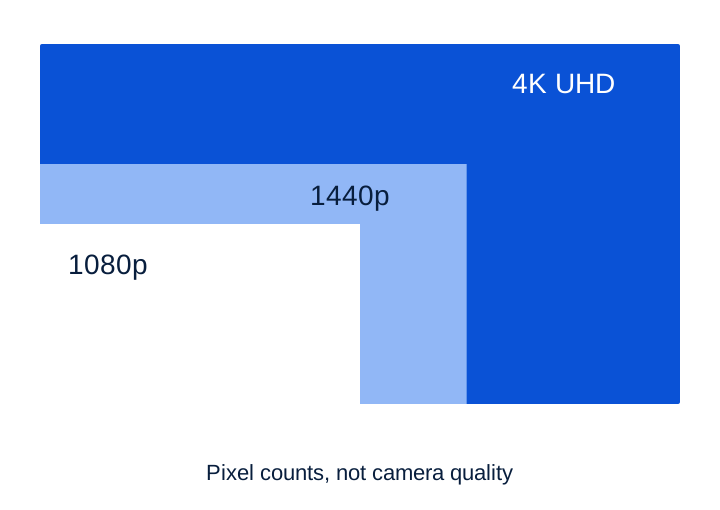
Common 16:9 examples. These are pixel counts, not camera-quality results.
Look beyond the 2K label. Doorbells can use taller or square images, and products sold as 2K do not all have the same pixel dimensions. Check the actual width and height, then look at the shape of the image. A taller view may be useful if you want to see both a visitor and a parcel near the door.
More pixels give you more to crop
Imagine a visitor standing in a wide view of your entrance. On your phone, the whole image may look perfectly adequate. Later, you might want to enlarge just the area where a parcel was left.
Digital zoom selects part of an image and displays it at a larger size. If that selected area contains more original pixels, there can be more detail available to display. If there are too few, enlarging the area can make edges look soft or blocky.
The illustration below uses three versions of the same drawing. The scene, framing and selected area stay the same. Only the number of pixels in each version changes.
One drawing. Three pixel counts.
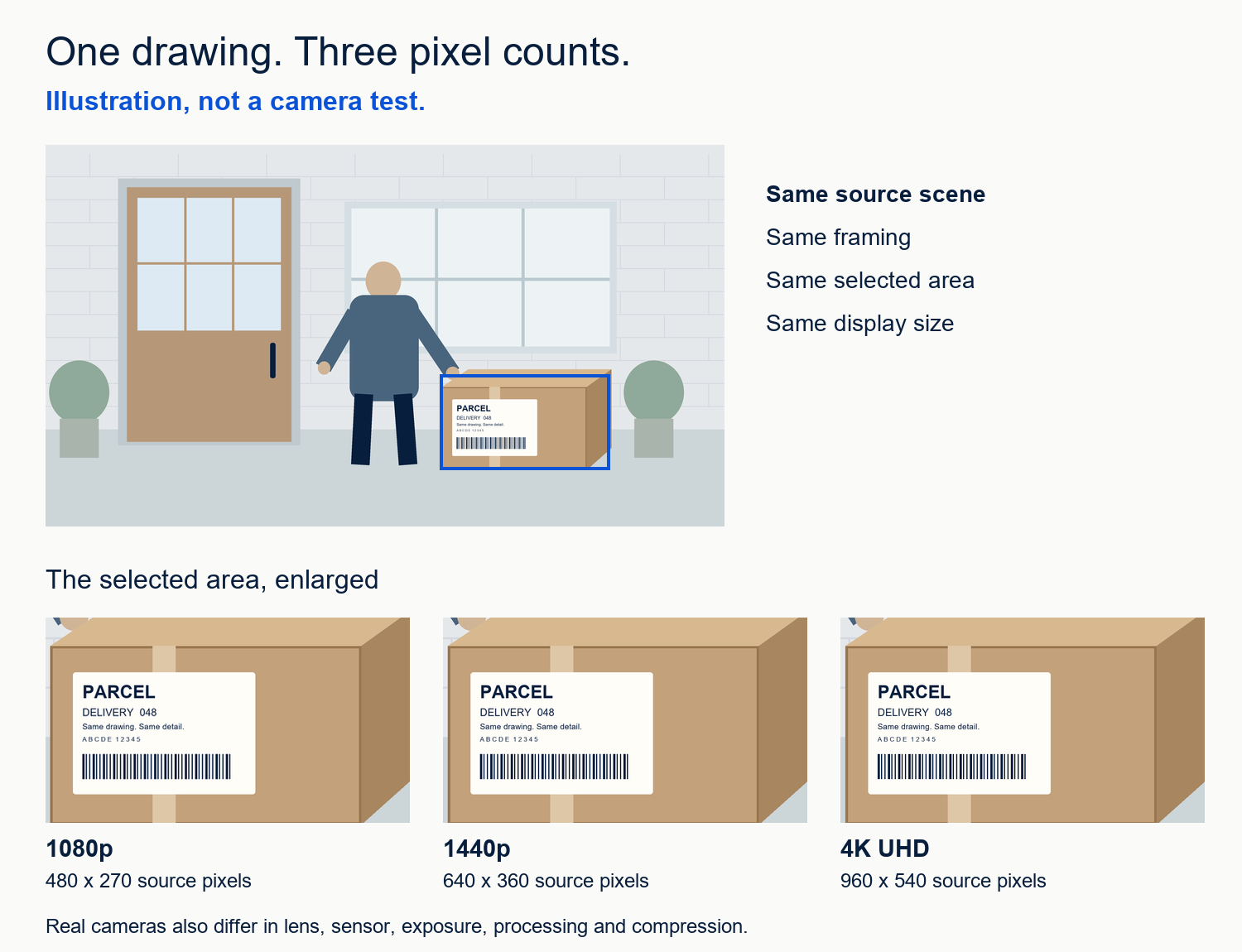
Illustration, not a camera test. All versions use one original drawing, the same framing, one downsampling method and the same display size. Real cameras also differ in lens, sensor, exposure, processing and compression.
At the size of a whole image on a phone, the difference may be modest. It can become easier to notice when you examine the same small area at a larger size.
This is an illustration of pixel sampling, not a comparison of real cameras. It leaves out differences in lenses, sensors, exposure, image processing and video compression. A real product comparison needs real recordings under comparable conditions.
Where those pixels land matters too
Two cameras with the same resolution can show different amounts of a scene. A wider view includes more of the surroundings, but spreads its available picture elements across that larger area. The person or object you care about can occupy a smaller part of the image.
Here is a simplified example using the same 1920 pixels across both images. Imagine measuring the scene width along one fixed line across the entrance: one view covers four metres; the other covers eight.
The same pixels over a wider view
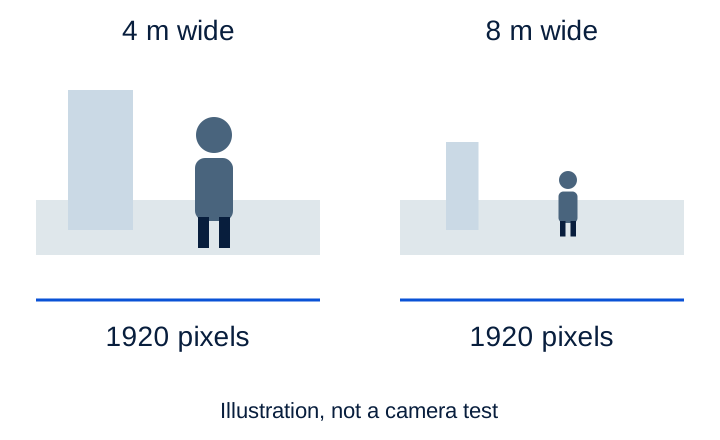
Illustration, not a camera test. The example shows 480 versus 240 pixels per metre along one chosen line. These are not recognition distances or performance thresholds.
The four-metre example has twice as many horizontal pixels per metre along that line. That is a mathematical illustration, not a promise about recognising someone at a particular distance.
A wider view can still be exactly what you need. The point is to check whether the important area receives enough useful detail. Moving a camera, changing its angle or using a more suitable lens may address a framing problem more directly than choosing a larger resolution number.
For a doorbell, check the complete view: the visitor's face, where parcels are normally placed and any part of the entrance you need to see. Horizontal, vertical and diagonal viewing angles describe different measurements, so compare them like for like.
Why 4K does not automatically mean better night video
A resolution number does not tell you how well a camera handles a moving person in low light.
For example, a longer exposure lets each frame collect more light, but can also blur someone who is walking. A still picture of an empty entrance may look bright while showing little about how a visitor will appear in motion.
Backlighting creates another challenge: a person may stand in shadow with a bright sky or street behind them. Features described as HDR or WDR aim to handle differences between bright and dark parts of a scene, but their results and trade-offs depend on the implementation.
When night performance matters, ask to see a moving subject in relevant lighting. Look for detail on the subject, not just a colourful or well-lit background.
Higher resolution is part of a recording system
Your camera has to capture, process and deliver its video. Compression reduces the amount of data needed, but the quality settings, frame rate (the number of images recorded each second), movement and complexity of the scene affect the recorded result. More pixels alone do not determine the file size or the network connection you will need.
That is why a general rule such as “4K uses this many gigabytes a day” is not enough. You also need to know whether recording is continuous or event-based, the recording settings and how long footage is kept.
Check which version of the image you are comparing: live view, a saved recording or an exported clip. Ask whether the advertised maximum resolution applies to the recording you can actually save and review.
Which questions fit your situation?
| Your situation | What to look for |
|---|---|
| A visitor close to the front door | A view that includes the visitor and the important area around the doorstep. Compare actual examples in daylight and after dark. |
| A wider drive, garden path or business entrance | Detail at the particular place you care about. Extra pixels can help, but check framing and original recordings before relying on a crop. |
| A dark or strongly backlit entrance | A moving subject in those conditions. A resolution label or a bright still image cannot answer this on its own. |
| A connection or storage capacity with limits | Recording quality, actual data use, available settings and what you can still view or save. |
If you already have a camera, start by looking at an original saved clip. Can you see the information you need in the place and conditions that matter? If not, first consider framing, lighting and recording settings. Replacing the device with a higher-resolution model is one possible answer, not the only one.
Six questions to ask before choosing
- What do I need to see, and in which part of the scene?
- What are the actual recorded pixel dimensions and image shape?
- Does the viewing angle include both the subject and the area I need?
- Can I see an original clip with a moving subject in relevant daylight, backlight and night conditions?
- What detail remains when I crop that clip, rather than looking at a small preview?
- What recording settings, connection, storage and ongoing costs does that quality require?
More pixels can be valuable when they preserve useful detail in the right part of the image. Choose the camera and setup that demonstrate the job you need them to do, with a picture you can actually use.